Settings
Relay includes a full in-app Settings area for both end users and instance admins. This page focuses on what each Settings tab does. For the Relay-specific feature list itself, see Relay Features.
Use the Search settings field at the top of the Settings window to search across available controls and jump directly to a matching setting. Results are grouped by tab and open the relevant section when selected.
Settings tabs at a glance
| Tab | What it controls | Notes |
|---|---|---|
| General | App integration, settings sync, typing notifications, call display name, automatic away message | Available to signed-in users |
| Appearance | Text styling, message formatting, link previews, video embeds, query status indicators, status message display, favorite-channel visibility, image viewer zoom direction, and autocomplete behavior | User preference tab |
| Themes | Built-in themes, theme import/export, custom CSS | Relay extends upstream theme handling |
| Aliases | Custom IRC command shortcuts | Relay-specific feature |
| Uploads | Per-user upload cleanup and metadata removal | Only useful on authenticated instances with uploads enabled |
| DCC files | Received experimental DCC files, expiry information, and deletion | Private authenticated instances when enabled by an admin |
| Short Links | Per-user short link review, sorting, and deletion | Available when the link shortener is enabled on non-public instances |
| Security Keys | Passwordless login keys and passkeys | Private authenticated instances only |
| Notifications | Push, browser, and in-window notification behavior, reply/reaction alerts, highlight keywords | Per-user notification preferences |
| Account | Profile avatar, optional per-network avatar overrides, password changes, and session management | Avatar support requires an admin-enabled non-public instance |
| Stats | Personal activity totals, message graphs, and storage usage | Relay-specific visibility into usage |
| Admin | Server-wide configuration, message storage, branding, registration, uploads, short links, partyline, SMTP, OIDC, Jitsi, KLIPY, user management, restart controls | Admin accounts only |
General
The General tab covers client behavior that does not fit elsewhere:
- Add Relay to the home screen as a native-style web app on supported browsers.
- Register Relay to open
irc://links directly from the browser. - Synchronize settings between clients when settings sync is enabled.
- Toggle typing indicators and whether your typing state is sent to others.
- Set the display name used during Jitsi voice/video calls.
- Configure an automatic away message.
Appearance
The Appearance tab controls how chat content is presented:
- Show or hide the server MOTD.
- Switch between 12-hour and 24-hour-style timestamp behavior, with an option to include seconds.
- Control link preview expansion for media and websites.
- Show inline video embeds when the instance administrator enables them, independently of other link previews.
- Choose how status messages are shown: expanded, condensed, or hidden.
- Enable colored nicknames.
- Show online status indicators for private queries.
- Hide favorite channels when networks are collapsed while keeping them visible when networks are expanded.
- Choose whether the image viewer inverts the mouse-wheel zoom direction.
- Use the text styling toolbar to preview and apply IRC-compatible formatting and colors while composing messages.
- Enable syntax highlighting for labeled fenced code blocks and choose a Prism theme for supported languages.
- Enable autocomplete for nicknames, channels, and commands, and choose what Relay adds after an autocompleted nickname.
Relay's autocomplete covers nicknames, channels, and commands directly from the chat input. Press Tab to complete the current match, press it again to cycle forward through suggestions, or use Shift+Tab to cycle backward.
Themes
The Themes tab lets users personalize Relay's look and feel:
- Open the searchable theme selector to browse Relay's large collection of built-in themes by category, filter by name or category, preview candidates, and apply a selection.
- Export the active theme as a CSS file.
- Import a CSS file as a new selectable theme.
- Add custom CSS overrides directly in the browser.
This is one of Relay's most visible customization features, especially for communities that want custom branding without rebuilding the client.
Aliases
The Aliases tab manages custom IRC command shortcuts.
- Create short commands such as
/shrugor/jthat expand into longer IRC commands. - Use positional variables like
$1and$2,$*for all arguments, and$channelfor the current channel name. - Edit or delete aliases from the same screen.
Relay also supports alias expansion in chat input and command autocomplete.
Uploads
The Uploads tab is the user-facing side of Relay's file handling:
- Remove image metadata before uploading when desired.
- Review previously uploaded files.
- Sort uploads and delete individual items.
Upload expiration is now controlled by the instance admin as a server-wide setting rather than as a per-user preference. If the admin disables uploads or the instance is running in public mode with upload restrictions, some options may be limited.
In the standalone desktop client, the Uploads tab also lets you choose between Relay storage and Catbox. Catbox returns a public shareable link, and Catbox-hosted files do not appear in Relay's upload manager; use the links in chat to access them. The browser client and mobile PWA continue using Relay's built-in upload storage.
DCC files
The DCC files tab lists files received through Relay's experimental DCC support. Incoming offers require explicit approval before Relay downloads them. Received files are private to your account, show their expiration time, and can be deleted from this tab.
Short Links
The Short Links tab lets users manage links created by Relay's built-in link shortener:
- Review the short links you have created.
- Sort links by short code, creation time, or expiration time.
- Open the short link directly to verify the redirect target.
- Delete links you no longer want to keep around.
This tab is available when the short-link feature is enabled and the instance is not running in public mode.
Security Keys
The Security Keys tab provides passwordless sign-in management:
- View registered hardware keys and passkeys.
- Add a new key with a friendly display name.
- Remove keys you no longer use.
This is Relay's WebAuthn/FIDO2 integration and works well with security keys, platform passkeys, and biometrics such as fingerprint-backed sign-in.
Notifications
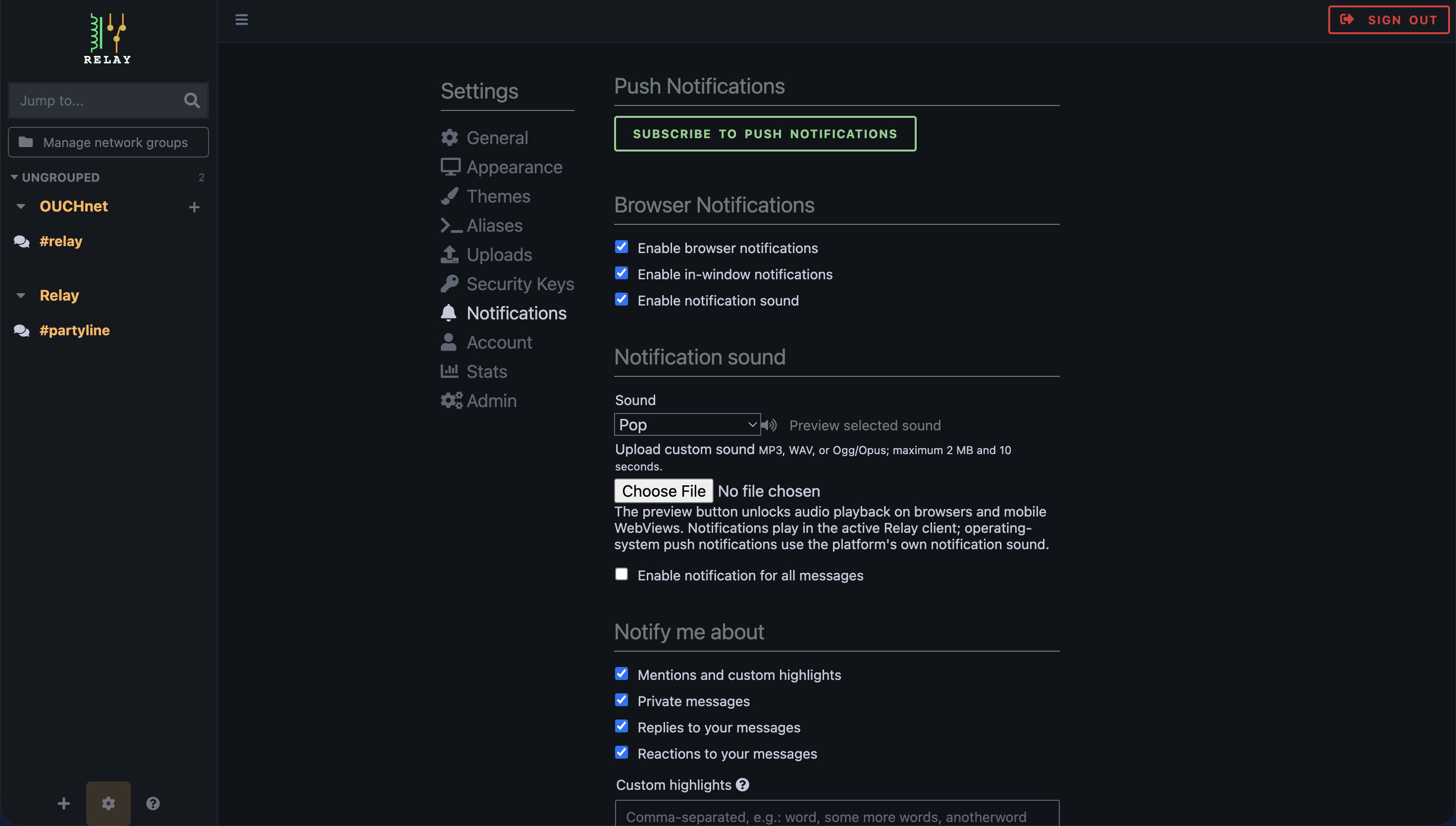
The Notifications tab controls how Relay gets your attention:
- Subscribe to push notifications.
- Enable browser notifications and notification sound.
- Enable in-window notifications in the active Relay client. Click an alert to jump to its channel, dismiss it manually, or let it disappear automatically after a short delay.
- Choose from the expanded set of bundled notification sounds and preview the selected sound.
- Upload a custom MP3, WAV, or Ogg/Opus notification sound up to 2 MB and 10 seconds when the instance is private and file uploads are enabled.
-
Choose which message types can trigger alerts.
- mentions and custom highlights
- private messages
- replies to your messages
- reactions to your messages
-
Choose whether all messages can trigger notifications when broader alerts are desired.
- Enable or disable notifications for all messages in an individual channel or conversation from its context menu.
- Define custom highlight words.
- Define highlight exceptions to reduce noise.
These settings apply to browser notifications, in-window notifications, and push notifications, subject to Relay's usual mute and freshness checks. The preview control enables audio playback in browsers and mobile WebViews; operating-system push notifications use the platform's own notification sound. When an IRC network supports IRCv3 invite-notify, Relay can also notify you when someone invites you to a channel. Typing notifications are configured in General, while message alerts live here.
Account
The Account tab combines profile metadata with account security and session hygiene:
- Set a user-visible display name.
- Add a homepage link to your profile.
- Choose a nickname or identity color.
- Set a custom status that is separate from Relay's online and away indicators.
- Upload, change, or remove a global persistent profile avatar when the instance enables avatars.
- Optionally set a different avatar for an individual IRC network. Networks without an override inherit the global avatar, and the partyline uses the global avatar.
- Choose an image to display beside your messages and in user information.
- Change your password.
- Sign out from the prominent control in the Settings header.
- Review the current signed-in session.
- Review other sessions across browsers and devices.
- Revoke old sessions without changing your password.
On IRC servers advertising draft/metadata-2, Relay synchronizes these profile values with IRC users. On servers without that capability, Relay still saves and displays the values locally, but they are not shared over IRC. Avatar uploads use the existing upload UI and are available only when an administrator enables them on a non-public instance. The administrator also sets the maximum avatar file size. Custom status remains separate from Relay's online and away indicators.
This is especially useful on shared devices or when testing across multiple clients.
Stats
The Stats tab surfaces usage information that is not documented elsewhere in the current docs:
- Personal totals such as connected networks, joined channels, messages logged, and storage used.
- A graph of messages logged over the last 7 days.
- Server-wide totals such as total networks and total channels across all users.
- Storage-by-user reporting, including upload and log usage.
- A manual refresh action for on-demand recalculation.
Large instances may take a little longer to compute storage statistics because Relay scans cached usage data and user storage on demand.
Admin
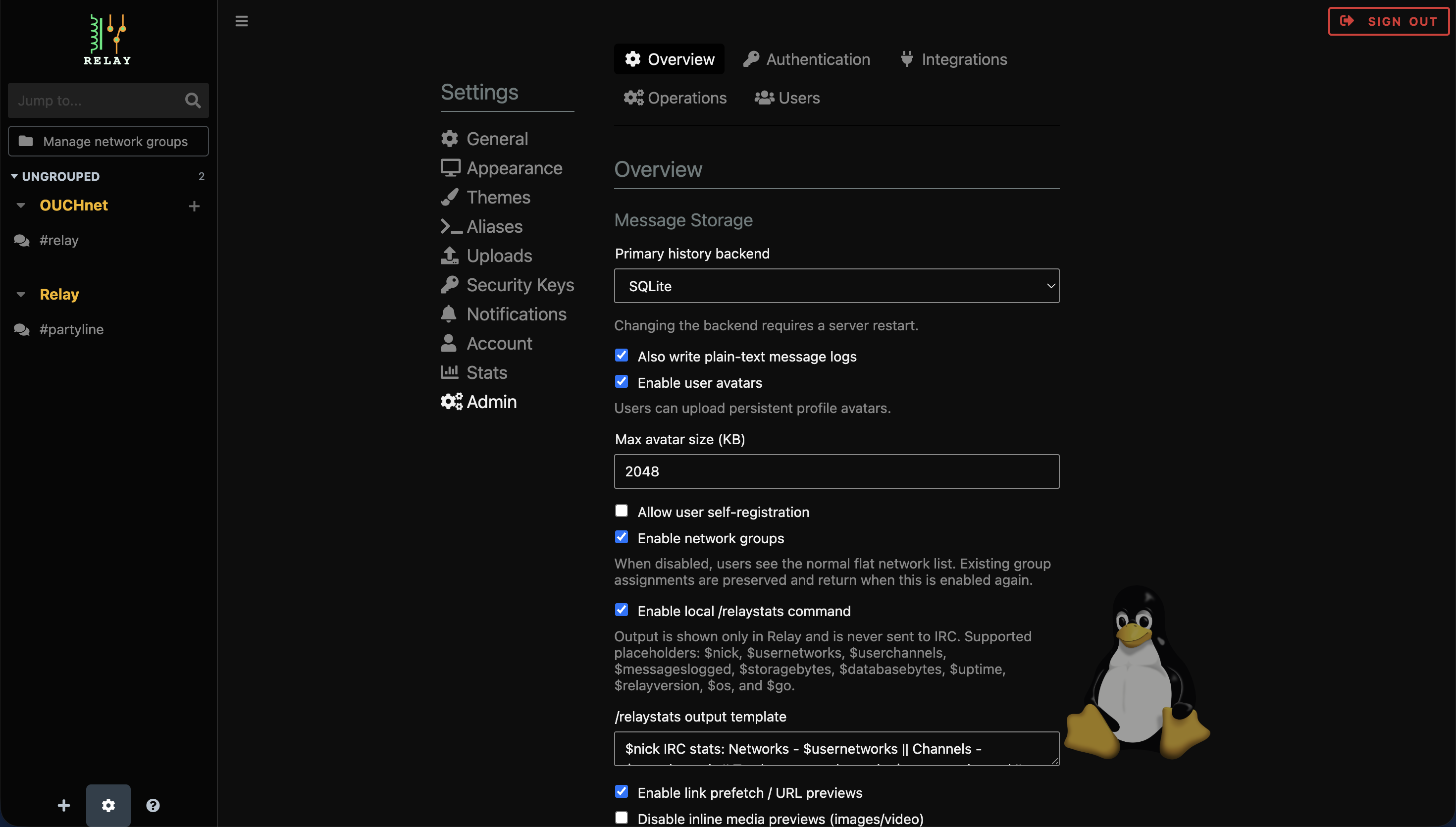
The Admin tab is Relay's server-side control panel for administrators. It is organized into Overview, Authentication, Integrations, Operations, and Users subsections so related controls are easier to find.
Server configuration
Admins can manage server-wide behavior without editing config files manually:
- Allow or disable self-registration.
- Enable or disable network groups in the sidebar.
- Enable or disable link prefetch and URL previews.
- Disable inline media previews when needed.
- Enable or disable click-to-play inline video embeds. Link prefetching must also be enabled, and inline media previews must remain enabled.
- Control whether prefetched media is stored on the server.
- Set maximum prefetch image size.
- Enable file uploads.
- Set maximum upload size.
- Set the server-wide upload expiration default.
- Enable experimental DCC file receiving after configuring its resource limits.
- Set the DCC listen and advertised addresses for passive transfers.
- Set maximum file size, concurrent transfers, retention time, and minimum free disk space.
- Randomize download URL segments for new DCC files.
- Enable or disable persistent user avatars.
- Set the maximum avatar file size.
- Choose the default theme for the instance.
- Set maximum stored channel history.
- Choose the primary message-history backend: SQLite, PostgreSQL, or disabled.
- Enable or disable plain-text message logs separately.
- Configure the PostgreSQL connection string and connection-pool limits when PostgreSQL is selected.
- Configure optional message retention with
storagePolicyinconfig.yaml, including the maximum age and whether status messages or all messages are deleted. Runrelay storage cleanfor an immediate cleanup. - Enable or disable the local
/relaystatscommand. - Customize the
/relaystatsoutput template with supported placeholders such as$nick,$usernetworks,$userchannels,$messageslogged,$storagebytes,$databasebytes,$uptime,$relayversion,$os, and$go.
Some server-level changes require a server restart to take effect.
Deployments that must expose only a preconfigured network can set
lockNetwork: true in config.yaml. This prevents users from changing the
network's connection and proxy settings; public mode applies the same boundary
automatically and also hides the configured transport credentials.
SQLite is the default message-history backend. The PostgreSQL connection string is stored server-side and is never returned to the browser. Changing the backend or PostgreSQL connection settings requires a server restart.
The /relaystats command renders its output only inside Relay and never sends it to an IRC network. Its default template can be replaced from the Admin settings when the command is enabled.
For settings that require a reload, Relay now shows explicit Apply Changes and Cancel controls so admins can either commit pending config updates or discard them directly from the web UI.
Branding
Relay can also expose custom brand artwork from the admin panel:
- Set a primary brand logo URL for the sidebar and auth screens.
- Optionally set a separate inverted logo URL for better dark/light theme contrast.
- Upload logo assets directly from the admin panel when file uploads are enabled.
- Use Relay-hosted upload URLs or any other reachable image URL.
If no inverted logo is provided, Relay falls back to the primary logo URL automatically.
Email / SMTP
Relay can enable SMTP for email-backed workflows:
- Enable SMTP support.
- Use SMTP for registration email verification.
This ties directly into Relay's optional self-registration flow.
Link Shortener
Relay can automatically shorten long links pasted into the compose box before a message is sent:
- Enable or disable automatic short-link creation.
- Set the minimum pasted URL length that triggers shortening.
- Configure short-link expiration in hours, including
0for no expiration. - Choose the short-link path prefix, such as
/s/. - Optionally set a dedicated base URL for generated short links.
Admins can turn the embedded link shortener on or off server-wide. When it is enabled, users manage their own created links in the Short Links tab. The feature mirrors Relay's existing upload-management pattern, but stores redirect data server-side so short links can resolve without needing the creating user to be known at redirect time.
Partyline
Relay can also expose an internal cross-user chat channel named #partyline:
- Enable or disable the partyline feature server-wide.
- Choose the synthetic network and channel naming used for the internal partyline.
- Let all local Relay accounts on the same instance chat together without relying on an IRC network connection.
- Reuse Relay's existing message pipeline for replies, reactions, Jitsi presence, and GIF support inside the shared internal channel.
Partyline is off by default. When enabled, Relay creates a synthetic always-available channel for local users on the same server instance, and its history remains tied to a stable internal network ID so earlier messages still load after a server restart.
Single Sign-On (OIDC)
Relay can also integrate with an OpenID Connect identity provider for single sign-on:
- Enable single sign-on on the sign-in page.
- Set the OIDC issuer URL.
- Configure the client ID used for Relay.
- Set or replace the client secret.
- Define the requested scopes, such as
openid profile email. - Choose the username claim path Relay should read from the provider response.
Users must already have a matching Relay account for sign-in to succeed. A provider-specific username claim such as relay_username is recommended so Relay can map the identity cleanly.
When configuring the provider, use Relay's OIDC callback URL from the admin screen as the redirect URI.
Voice/video calls (Jitsi)
Admins can configure the built-in Jitsi integration:
- Enable or disable Jitsi Meet voice/video calling.
- Set the Jitsi server URL used by the instance.
GIF Picker (KLIPY)
Admins can configure the KLIPY GIF experience:
- Enable or disable the GIF picker in chat input.
- Set or replace the KLIPY API key.
The API key remains server-side and is not exposed directly to clients.
User management and maintenance
The admin panel also includes operational controls:
- Restart the Relay server from the web UI.
- View users.
- Grant or remove admin access.
- Enable or disable per-user logging.
- Reset passwords.
- Add new users directly from the admin panel.
Related pages
- See Relay Features for the high-level list of Relay-specific features.
- See Installation for Docker, Compose, and first-run setup.
- See Known Limitations for ZNC and soju behavior around replies and reactions.